Searching LinkedIn jobs in Uganda works best when you combine a specific role, an honest profile and a check of the employer’s application instructions. Start with the Jobs tab, choose Uganda or your actual target location, narrow the results, then save a useful search as an alert. You do not need a paid subscription to begin.
The difficult part is not creating an account. It is deciding what to put in your headline, finding roles outside a noisy feed and knowing whether pressing Apply actually submitted anything. If you already have a job, you also need to understand what colleagues might see before changing your visibility settings.
This guide walks through those decisions using Uganda-focused profile examples, a search worksheet and short networking messages you can adapt. It also explains where LinkedIn fits beside BrighterMonday and Fuzu without ranking platforms by hiring success that they have not publicly proved. The examples are illustrations, not live vacancies or claims about a named employer’s recruitment process.
Last checked: 15 November 2026 against LinkedIn Help’s job-search instructions and the official platform pages linked below. Controls can differ between the app and desktop.
Table of Contents
Build a profile that proves the work you can do
Before searching, choose a job family. An accounts assistant, a customer-service officer and a monitoring and evaluation assistant need different evidence. Read relevant adverts and identify the tools and duties you can honestly demonstrate. Use those terms in context rather than adding a long list of skills you have never used.
Write a headline with a clear professional direction
A useful headline names your field and a capability. A fictional graduate might write: “Statistics graduate | Excel reporting and survey data cleaning | Seeking M&E assistant roles”. An experienced applicant could use: “Customer service officer | Complaint resolution and branch operations”. Replace every detail with your own background; do not award yourself a senior title to match an advert.
Use your real location, including an upcountry town where appropriate. Someone based in Gulu should not claim to live in Kampala merely to look searchable. State willingness to relocate separately where the profile or job preferences allow it. Keep employment titles, dates and qualifications consistent with your CV.
Turn the About and Experience sections into evidence
Write the About section around the work you can perform, where you learned it and your intended next role. For a graduate, this can come from field attachment, coursework or a genuine project. An employed applicant can describe responsibilities without exposing customer records, internal performance figures or confidential employer plans.
Illustrative About text: “I am a procurement graduate with attachment experience organising purchase files and checking delivery records. I use Excel to track outstanding documents and enjoy work that needs careful follow-up. I am looking for an assistant role where I can support purchasing and build practical procurement experience.” Use this as a structure, not a biography to copy.
Under Experience, describe an action and its output. “Prepared weekly stock-movement summaries in Excel” says more than “hardworking team player”. Add measurable results only when you can support them. Label internships, volunteering and academic work accurately. Do not turn a classroom assignment into paid employment.
Add relevant skills, your actual education and a recent, clear photograph if you are comfortable sharing one. Ask a supervisor or lecturer who knows your work for an honest recommendation, not a scripted endorsement of skills they have never seen. LinkedIn’s own job-search checklist recommends keeping profile details current and building professional connections. For the separate document, use our Uganda CV-writing guide.
LinkedIn jobs in Uganda: search beyond one job title
Use Jobs for vacancy listings and Posts for hiring announcements shared in the feed. LinkedIn’s help page describes both routes. A search result is only a lead: the duty station, qualifications and employer’s current advert decide whether the role is suitable.
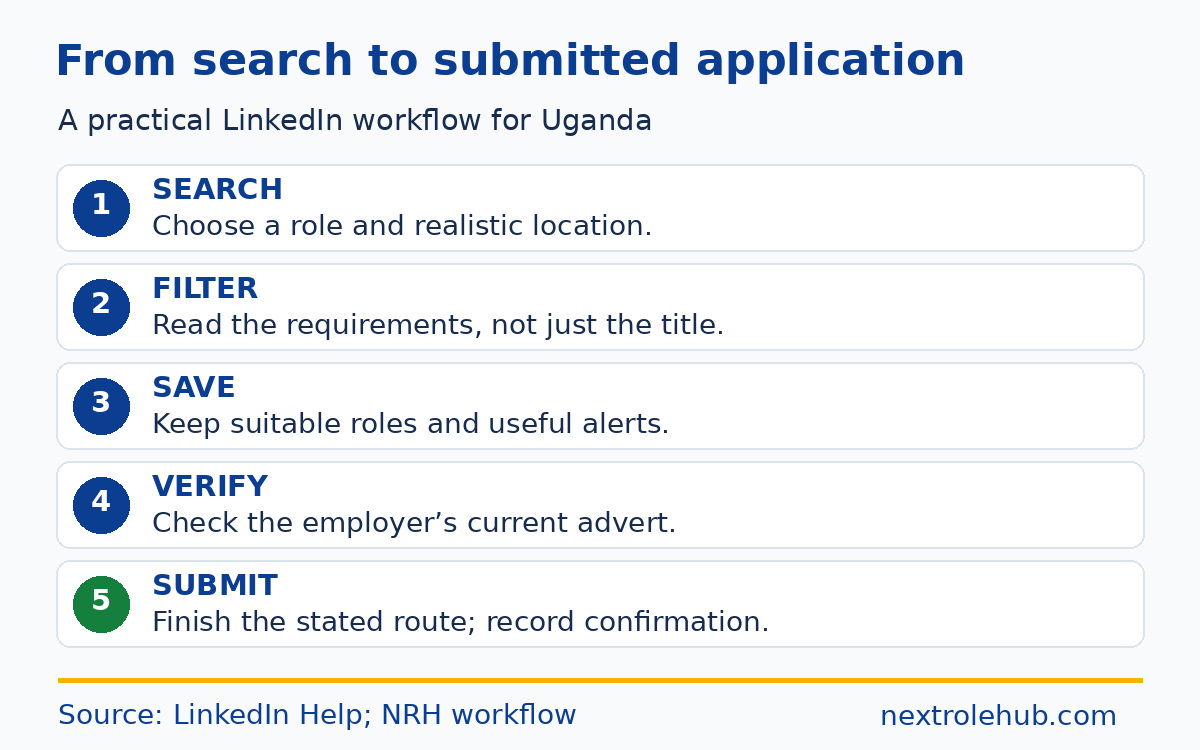
- Open Jobs and enter a specific role or describe the work you want. Start with Uganda as the location, or a town where you can actually work.
- Review the available filters and narrow by posting date, experience or workplace type where those controls appear. Check the description even when the filter says entry level.
- Try a related title or spelling. Search “programme assistant” and “program assistant” separately rather than assuming employers use identical wording.
- Save suitable roles. Turn on the alert for a search only after its results are relevant. Remove a filter if it hides too many useful opportunities.
- Run a separate Posts search for hiring announcements. Follow the employer’s company page and confirm any vacancy on its own source before sending documents.
Use the worksheet below as a starting point, not a list of current openings. Each row separates the title from the evidence and the location decision, so you can see why a result belongs in your shortlist.
| Your target | Search variations to try | Check before applying |
|---|---|---|
| Early-career finance | Accounts assistant; finance assistant | Qualification, experience requirement and actual duty station. |
| Programme support | Programme assistant; program assistant; project assistant | Field travel, reporting duties and required language skills. |
| Customer service | Customer service officer; client service assistant | Work location, shifts and whether sales responsibilities are included. |
| Data and reporting | M&E assistant; monitoring and evaluation assistant; data assistant | Required tools and whether the role is junior or needs independent technical delivery. |
Do not rely on a title alone. A “project assistant” can involve office administration, field mobilisation or technical reporting. Read the essential requirements before spending an evening tailoring documents. If the results are too broad, add a function such as procurement or reporting rather than repeatedly searching “jobs Uganda”.
Remote does not automatically mean eligible from Uganda
LinkedIn documents a Remote filter and alerts for remote searches. Still read the country, employment and working-hours conditions in each advert. A remote role may restrict where an employee can be based. If Uganda eligibility is unclear, use the employer’s published contact route rather than assuming a worldwide arrangement.
Easy Apply and Apply: finish the correct application
Easy Apply means the application is completed within LinkedIn. Apply takes you to an external company or third-party website. Neither button is a hiring decision, and opening an external form is not submission. Follow the advert, complete the required fields and keep whatever confirmation the application system provides.
Before uploading a CV, compare the LinkedIn listing with the employer’s current vacancy page. Check the exact title, reference, location and closing information. If the original advert has closed or the details conflict, investigate first. Do not submit to a stranger’s inbox merely because they reposted a familiar company logo.
- For Easy Apply, review contact details and the selected CV, answer screening questions truthfully, and continue until the final submission confirmation. Do not confuse a saved draft with a sent application.
- For an external Apply route, inspect the destination domain, open the correct vacancy and follow that system’s requirements. Creating a profile on the employer’s site may still leave the actual vacancy application unfinished.
- After either route, record the employer, title, original advert URL, submission date and confirmation. Keep the exact CV version sent so you can prepare for a screening call.
LinkedIn’s job-search checklist says its application list covers Easy Apply jobs hosted there, not applications completed on company websites. Maintain your own record for external applications. Our guide to applying for jobs in Uganda covers document packs and submission procedures in more detail.
Do not assume an alternative route receives special treatment. If the employer requires a portal, a message to a manager is not a substitute. Equally, avoid duplicate submissions just because the same vacancy appears on several boards. Use the route specified by the employer.
Network with a reason, not a mass CV message
Begin with people who can place you: former colleagues, classmates, lecturers or professionals whose work you genuinely follow. A connection is an introduction, not permission to demand a referral. A short, relevant question gives the other person something manageable to answer.
When reconnecting with someone you know
Adapt this message only if the shared history is true: “Hello [Name], we worked together during [placement or project]. I am exploring [type of role] and would be glad to reconnect. I enjoyed learning about [specific work we shared].” Where a personalised invitation is available, keep the note within the limit shown in your account.
When asking for career information
After an appropriate introduction: “Thank you for connecting. I am developing my Excel reporting skills for programme-support roles. From your work in this area, what would you suggest I practise next?” Ask about a field the person actually knows. Avoid sending several questions or attaching a CV they have not requested.
When you have already applied
If the advert permits contact: “Hello [Name], I submitted my application for [exact role and reference] through [required route]. My relevant background is [one truthful capability]. If further information is needed, I would be happy to provide it. Thank you.” Send it only to a relevant, verified contact, not every employee you find.
Read company updates for context, then contribute when you have something useful to say. You do not need to post daily or pretend to have expertise you lack. A thoughtful response about a real work process is more credible than repeated “interested” comments under unrelated vacancies. No message template guarantees a reply.
Choose privacy settings before signalling your search
Recruiters only is more discreet than a public Open to Work frame, but it is not a promise of secrecy. LinkedIn says it takes steps to hide shared career interests from recruiters at your current employer, while explicitly warning that complete privacy cannot be guaranteed.
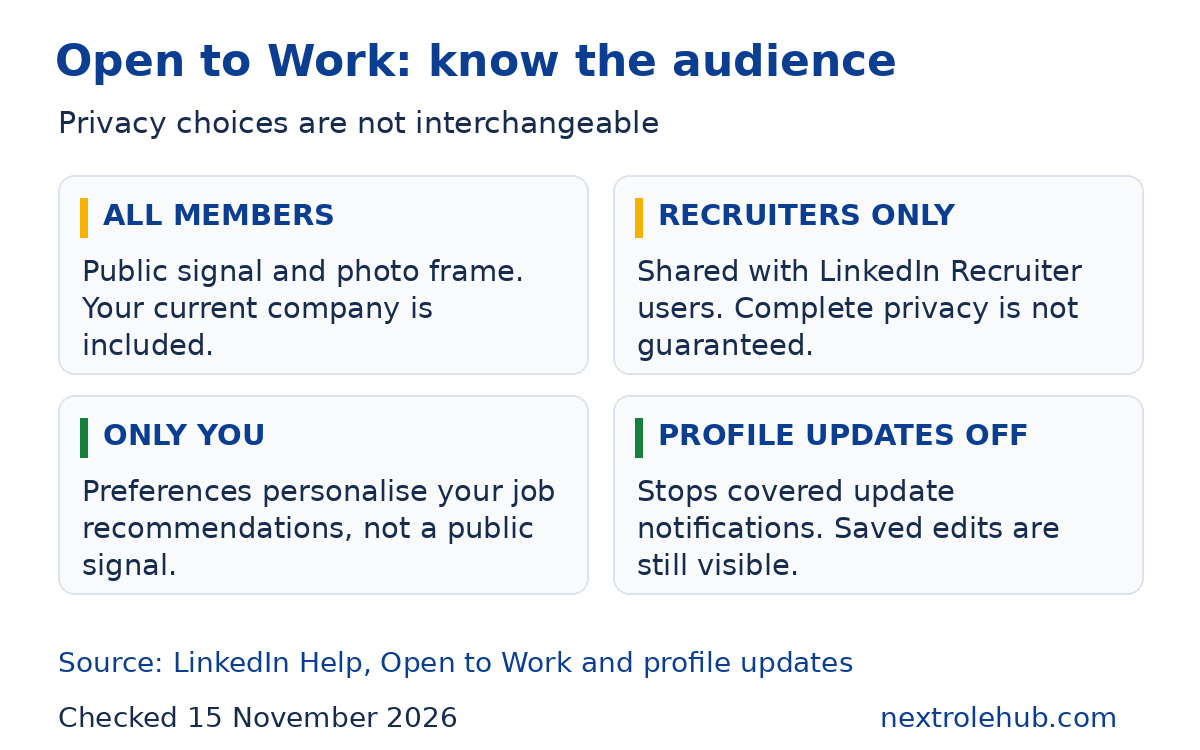
Check LinkedIn’s current Open to Work guidance before choosing an audience. It describes three options: all members, recruiters only and preferences visible only to you. Your current employer information should be accurate because LinkedIn uses it when applying its employer-related privacy protections.
| Setting | What it is for | Limit to remember |
|---|---|---|
| All LinkedIn members | Publicly tell the network you are open; adds the photo frame. | People at your current company are included. |
| Recruiters only | Share career interests with people using LinkedIn Recruiter. | LinkedIn does not guarantee complete privacy. |
| Visible only to you | Use preferences for your own job recommendations. | It is not a public invitation to recruiters or your network. |
| Share profile updates off | Stop notifications about the profile edits covered by this control. | Anyone viewing your profile can still see saved changes. |
For profile-change notifications, LinkedIn’s Share profile updates instructions give the desktop path: Me, Settings & Privacy, Visibility, then Share profile updates. Switch it off if you do not want those update notifications sent. This control is separate from your Open to Work audience.
Review public-profile and contact-information visibility separately in your account. Do not add a home address, National Identification Number or scanned identity document to a public profile. If you share a work sample, remove personal and confidential information first. A profile should demonstrate capability without becoming a public document store.
Where LinkedIn fits beside BrighterMonday and Fuzu
Use LinkedIn for the combination of a professional profile, company information, conversations and job search. BrighterMonday and Fuzu offer other ways to discover openings and receive recommendations. The comparison below describes their official features, not a ranking of who gets hired fastest.
| Platform | Officially described tools | How to use it alongside LinkedIn |
|---|---|---|
| Jobs search, alerts, saved roles, professional connections and two application routes. | Research people and companies, then complete the authorised application. | |
| BrighterMonday Uganda | Job search and applications, profile tools and tailored alerts. | Check its Uganda listings for relevant roles you did not find in your LinkedIn searches. |
| Fuzu Uganda | Profile and CV tools, personalised matching, smart alerts and career resources. | Keep your skills and interests accurate, then assess each recommendation against the advert. |
These descriptions come from the linked LinkedIn guidance, BrighterMonday’s job-seeker page and Fuzu’s Uganda page. Fuzu describes its job-seeker offering as free. Features and optional paid products can change, so check the current terms before paying for extras.
For the wider choice of boards, government channels and NGO sources, read our comparison of job websites in Uganda. This guide concentrates on using LinkedIn well rather than repeating that broader directory. No platform listing replaces a check of the actual employer’s instructions.
A weekly plan that produces a useful shortlist
Try this routine and adjust it to your available time. These are suggested actions, not a required application quota or a claim about how quickly an employer replies. Keep the output visible: relevant adverts saved, accurate applications submitted and useful conversations started.
- At the start of the week, review your saved searches. Remove irrelevant alerts and test one alternative title if suitable openings are missing.
- During the week, check new alerts and save only roles with a plausible match. Verify the employer source before preparing an application.
- Set aside an uninterrupted session to tailor documents and finish applications. Record external submissions as well as Easy Apply applications.
- At the end of the week, review what is blocking progress: missing qualification evidence, unsuitable locations, unfinished forms or searches aimed at the wrong level.
Save an advert before it disappears and note the claims in your profile that an interviewer may ask you to explain. When an invitation arrives, prepare truthful examples using our Uganda interview questions and sample answers. Search activity is useful only when it turns into applications you can defend.
Questions about LinkedIn job hunting in Uganda
Do I need LinkedIn Premium to apply for jobs?
No. A free account is enough to begin searching and using ordinary application routes. LinkedIn’s public June 2025 Premium explanation distinguishes optional paid insights and messaging features from the basic search. Start free and improve your profile first. If you later consider a subscription, check the price, billing period, cancellation terms and the specific feature you need.
Can I use LinkedIn if I do not have paid work experience?
Yes. Build the profile around education, an actual project, field attachment, volunteering or another activity you can explain honestly. State the activity’s correct status and your own contribution. A useful entry describes what you produced or learned, rather than pretending that a student project was employment. Search graduate, trainee, internship and assistant titles, then read each advert’s requirements.
What if the application form will not finish on my phone?
First check the employer’s file-format and upload requirements. Save your work if the form allows it, then try a supported browser or a computer you trust. LinkedIn’s search guidance notes that completing an application can be easier on a computer. Avoid public-device password saving, sign out afterwards and keep confirmation that the application was submitted, not merely started.
Should I send my academic documents in a connection message?
Not as an unsolicited introduction. Begin with a relevant reason for connecting and use the employer’s required application channel. If documents are requested later, verify who is asking, why the files are needed and whether the request matches the official advert. Keep certificates and identity documents out of public posts and do not send passwords or one-time codes.
What should I do if a recruiter asks me for mobile-money payment?
Pause the conversation and verify the request independently with the named employer using contact details from its official website. Do not pay for a promise of shortlisting or employment. Preserve the message and account details, and use LinkedIn’s reporting option for a suspicious post or profile. A professional-looking photograph or company logo is not proof that the sender represents that organisation.
Make your next search specific enough to act on
For your next search of LinkedIn jobs in Uganda, choose a role family, correct one weak profile section and save an alert with a realistic location. Then verify a suitable vacancy with the employer and finish the stated application route. Keep privacy choices deliberate and networking requests relevant. A smaller, credible shortlist beats a feed full of roles you cannot apply for.