

How to Beat ATS (Applicant Tracking Systems) in Uganda in 2026
ATS Uganda screening is now part of many online job applications. This guide shows you how applicant tracking systems work, where they appear in Uganda’s job market, and how to format your CV so it reaches a real recruiter.
If you keep applying for jobs online and hearing nothing back, the problem is not always your qualifications. In many cases, your CV is being screened by software before a recruiter ever opens it. That software is usually called an Applicant Tracking System, or ATS. Learning how to beat ATS in Uganda matters because more employers now collect applications through job boards, structured forms, and company career portals instead of direct email alone.
That matters even more in a competitive labour market. Uganda Bureau of Statistics reporting shows a tight employment environment, with a national unemployment rate of 12.2% and youth unemployment of 18% in the 2025 Labour Market Survey. In a market like that, small CV and application mistakes can cost qualified candidates interviews they might otherwise have earned. Source: UBOS Labour Market Survey 2025.
This guide explains what ATS does, where ATS-style screening shows up in Uganda, why applications get filtered early, and what practical changes improve your chances. You will also get a safe ATS-friendly CV structure, Uganda-specific examples, common mistakes to avoid, and the next articles to read after you fix your CV.

Table of Contents
- What is ATS?
- How applicant tracking systems work
- Where ATS-style screening shows up in Uganda
- Why many applications fail before human review
- How to beat ATS in Uganda
- How to use keywords from job descriptions
- ATS-friendly CV template structure
- Uganda-specific application realities
- Expert Tips
- Common Mistakes To Avoid
- Frequently Asked Questions
- Conclusion
What is ATS?
An Applicant Tracking System is software that helps employers collect, organise, search, filter, and review job applications. In simple terms, it is the digital gatekeeper between your CV and the recruiter. If your application is unreadable, incomplete, or poorly matched to the role, it can be filtered before a human gives it proper attention.
ATS does not always reject people with one dramatic red flag. More often, it helps employers sort high volumes of candidates so the strongest matches appear first. That means your CV can be technically accepted but still sink too low in the shortlist because the wording is weak, the layout is confusing, or the skills do not clearly match the advert.
This matters most in high-volume roles such as graduate trainee jobs, NGO administration, customer service, banking operations, HR support, finance, logistics, and office administration. When hundreds of candidates are applying, systems and structured filters become part of the hiring workflow.
How applicant tracking systems work
The process is usually straightforward. An employer publishes a vacancy on a job board or career portal. Candidates then upload a CV, fill in profile fields, answer screening questions, and sometimes add a cover letter or certifications. The system stores that information in a structured database.
Next, the platform reads the application and breaks it into searchable parts. It tries to identify job titles, dates, education, employers, tools, certifications, locations, and important keywords from the advert. Recruiters can then search or filter candidates by criteria such as years of experience, qualification level, job title match, skill terms, assessment scores, or application status.
This is why an attractive designer CV is not always a strong online CV. If a system struggles to read your file, your experience may be split into the wrong sections, your dates may disappear, and your strongest skills may never surface in search results. ATS success is not about gaming software. It is about making your application easy to parse and easy to match.
Where ATS-style screening shows up in Uganda
You do not need to see the words “Applicant Tracking System” on a vacancy for ATS-style screening to be happening. In Uganda, it commonly appears anywhere an employer asks you to create a profile, upload a CV, complete fields manually, answer screening questions, or wait inside a structured application workflow.
Major job platforms already use employer-facing filtering tools
There is public evidence for this on large platforms. BrighterMonday’s own help centre says employers can manage applicants through its Applicant Tracking System, and its support articles show employers can filter and sort applications using keywords, assessment scores, qualification levels, and years of experience. Sources: BrighterMonday ATS help article and BrighterMonday filtering guide.
Fuzu’s Uganda employer page also describes candidate matching, shortlisting, assessments, and applicant tracking features for employers. That does not mean every application is rejected by AI alone, but it does confirm that structured candidate screening and ranking are part of the platform’s hiring process. Source: Fuzu Uganda employers.

Government and employer portals also push candidates into structured workflows
Uganda’s Ministry of Gender, Labour and Social Development supports digital employment services through labour and employment systems including ESMIS, where job seekers register, upload CVs, and match to vacancies while employers post jobs online. Sources: MGLSD Labour, Employment and Occupational Safety and Health and ESMIS portal.
Across many bank, telecom, NGO, and corporate career portals in Uganda, the workflow often follows the same structured pattern: account creation, form fields, screening questions, CV upload, and recruiter search later. Even when the employer does not publish the software name, that process behaves like ATS screening. For job seekers, the practical rule is simple: if the application is structured, your CV should be structured too.
Before you optimise for ATS, make sure the foundation is strong. Read how to write a CV in Uganda.
Why many applications fail before human review
Most failed applications are not failing because the candidate has zero potential. They fail because the CV and portal profile do a poor job of translating that potential into searchable, matchable information. The most common problem is mismatch. If the job asks for “accounts reconciliation,” “Excel,” and “monthly reporting,” but your CV only says “handled finance duties,” the system may not connect you to the role clearly enough.
The second problem is formatting. Multi-column templates, tables, text boxes, icons, progress bars, logos, and scanned PDFs can confuse parsing. When that happens, dates may shift, employers may disappear, and important bullet points may be ignored. A beautiful document can become a weak machine-readable document.
The third problem is incomplete applications. Many Uganda job seekers upload a CV and assume the work is finished, but portals often search the form fields separately from the uploaded file. If you leave out skills, certifications, dates, location, notice period, or screening answers, the system may treat your profile as incomplete even if the PDF looks fine.
There are also basic knockout issues: wrong file type, missing required documents, unclear degree information, poor email address, broken phone number, or a failed yes-or-no eligibility question. These seem small, but in a crowded shortlist they matter a lot.
How to beat ATS in Uganda
To beat ATS in Uganda, use a simple one-column CV, match the exact job description, complete every portal field, and avoid graphics or scanned files. The goal is not to trick software. It is to make your application easy for both screening systems and recruiters to read, search, and shortlist.
1. Use a simple one-column layout
Start with your name and contacts, then move in a straight line through summary, skills, experience, education, and certifications. Avoid sidebars, multiple columns, floating text boxes, graphics, and decorative design elements. The cleaner the reading order, the easier it is for software to interpret correctly.
2. Use standard section headings
Headings such as Professional Summary, Work Experience, Education, Skills, Certifications, and References are much safer than creative labels like My Journey, Career Highlights, or Why Hire Me. ATS tools classify information better when the structure is familiar.
3. Match the language of the job description
If the advert mentions customer retention, grant compliance, procurement planning, data analysis, cash reconciliation, or Monitoring and Evaluation, use those same terms where they genuinely describe your work. Do not replace the employer’s language with vague softer phrases if precision is what the system is searching for.
4. Prioritise relevant experience near the top
Your most relevant experience should be the easiest section to find. If you are changing careers, use your summary and first few bullets to translate transferable work into the target role’s vocabulary. Recruiters and software both reward relevance more than storytelling.
5. Choose a safe file format
If the employer gives no special instructions, a clean DOCX file is often the safest option. A text-based PDF can also work well. What you should avoid is a scanned image PDF or a file exported badly from a design tool. If the text cannot be copied, the system may struggle too.
6. Complete every required field in the portal
Do not assume the uploaded CV will do all the work. If there are profile fields for job title, achievements, education, tools, certifications, location, salary expectations, or notice period, complete them properly. In many systems, recruiter search uses those fields directly.
7. Remove unnecessary graphics and fancy elements
Profile photos, icons, charts, logos, skill bars, coloured background shapes, and infographic layouts may make a CV look polished, but they often create more risk than value in online applications. Use visual design only when you know a human will review the file directly and the role benefits from it.
8. Tailor each serious application
One master CV is useful, but one generic CV sent everywhere performs badly. For every role that matters, adjust the summary, key skills, job title phrasing, and first few bullets so they reflect that vacancy. This is the single fastest way to improve ATS match quality.
How to use keywords from job descriptions
The easiest way to improve ATS performance is to borrow the employer’s language accurately. Read the job title, responsibilities, requirements, and preferred qualifications carefully. Then highlight repeated words and repeated skill phrases. Those are usually the terms the recruiter or system is likely to search later.
For example, a finance officer advert may repeat phrases such as budget tracking, reconciliation, financial reporting, Excel, QuickBooks, tax compliance, and audit support. If you genuinely have those skills, place them naturally in your summary, your skills section, and your work experience bullets. That is stronger than writing broad lines like “handled finance work.”
Do not keyword-stuff. Recruiters still read these CVs. The right method is to place keywords inside real evidence. Instead of writing “Excel, reporting, analysis, budgeting,” write “Prepared monthly financial reports, updated budget trackers, and analysed variances in Excel.” That gives you machine readability and human credibility at the same time.
Practical rule: if a term appears multiple times in the advert and it truthfully matches your background, use it in at least two places in your application.
ATS-friendly CV template structure
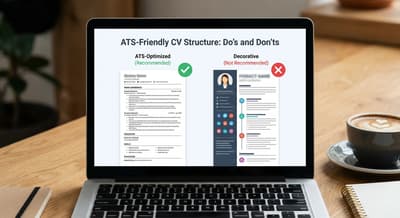
Use this structure for most online applications in Uganda:
- Full Name
- Phone Number and Professional Email Address
- Location — town or city is enough
- Professional Summary — 3 to 4 lines tailored to the job
- Key Skills — 8 to 12 skills drawn from the advert where accurate
- Work Experience — employer, title, dates, and achievement-based bullets
- Education — institution, award, and year
- Certifications or Training — only if relevant
- References — optional unless requested
Inside work experience, start bullets with strong verbs and add the right role language. “Prepared monthly financial reports, reconciled supplier accounts, and supported tax filing using Excel and QuickBooks” is much stronger than “Responsible for accounts work.”
| ATS-Friendly Choice | Risky Choice |
|---|---|
| One-column layout | Two-column designer template |
| Standard headings | Creative section titles |
| DOCX or text-based PDF | Scanned image PDF |
| Role-specific keywords | Generic vague wording |
| Simple bullet points | Charts, icons, text boxes, graphics |
Once your CV is fixed, strengthen the rest of the application with how to write an application letter in Uganda and how to apply for jobs in Uganda.
Uganda-specific application realities
Ugandan candidates rarely use one application route only. You may apply through a job board, a company website, a referral, WhatsApp, or email in the same week. That is why it helps to keep two CV versions: one ATS-friendly version for portals and one polished version for direct human sharing when appropriate.
Bank, NGO, and corporate portals usually demand cleaner CVs
Large employers often ask candidates to fill in structured forms, answer eligibility questions, and upload supporting documents separately. This is common in banking, telecom, development, and NGO hiring. When the process includes profile creation and mandatory fields, assume structure matters more than design. Your goal is clarity, not decoration.
Screening questions can quietly weaken strong candidates
A candidate can have a decent CV and still lose because the portal answers are careless. If the system asks about years of experience, location, availability, work permit status, degree level, or tool proficiency, answer precisely. Weak or rushed responses can reduce your visibility even before a recruiter opens the attachment.
Phone-based applications create avoidable mistakes
Many people apply using saved files from WhatsApp, cybercafés, or old phone storage. That leads to common errors: outdated CV versions, wrong filenames, mismatched contacts, damaged formatting, and missing attachments. If possible, review the final file on a laptop before submitting. That one habit can save you from easy rejection.
After fixing your CV, the next skill to master is interviews. Read how to prepare for a job interview in Uganda so you are ready for the stage after the shortlist.
Expert Tips
- Create one master CV and tailor copies for each serious role instead of rewriting from zero every time.
- Name the file professionally, for example: FirstName_LastName_CV.
- If the advert uses a specific job title and it honestly fits your background, mirror it in your summary.
- Keep abbreviations and full forms together where useful, such as Monitoring and Evaluation (M&E).
- Run a plain-text test by pasting your CV into Notepad or Google Docs. If the order looks messy there, it may look messy to ATS too.
- Update your phone number and email on every version before sending. Many missed opportunities come from old contact details, not weak qualifications.
Common Mistakes To Avoid
| Mistake | Why it happens | Solution |
|---|---|---|
| Using the same generic CV everywhere | It feels faster and easier | Tailor the summary, keywords, and first experience bullets for each role |
| Uploading a designer template to job portals | It looks modern and impressive | Use a plain one-column version for online systems |
| Skipping form fields because the CV is attached | Candidates assume recruiters will read the PDF first | Complete every required field because systems often search them directly |
| Using vague role descriptions | People try to sound broad and flexible | Use exact relevant terms from the advert where truthful |
| Submitting old files from phone storage | Applications are rushed | Check filename, contact details, file quality, and the latest edits before upload |
Frequently Asked Questions
Can ATS reject my CV automatically?
Yes. An ATS can reject an application automatically or rank it too low for a recruiter to notice. This usually happens when the CV lacks important role keywords, uses unreadable formatting, or fails required screening questions in the portal.
Do companies in Uganda really use ATS?
Yes. Public platform documentation from BrighterMonday and Fuzu shows structured employer-side screening, filtering, and shortlisting features. Many large employer portals in Uganda also use structured workflows that behave like ATS systems even when the software name is not published.
Is PDF or Word better for ATS?
A clean DOCX file is usually the safest unless the employer asks for PDF. A text-based PDF can also work well. The main risk is not the label alone, but whether the file is selectable, readable, and free from scanned images or broken formatting.
Should I use tables in my CV?
For online job applications, it is safer to avoid tables. Some systems read them badly and may mix up dates, employers, and achievements. A simple one-column structure is more reliable for both software and human reviewers.
How many keywords should I add?
There is no perfect number. Add the most important repeated skills, tools, and job phrases that genuinely match your background. Focus on natural placement inside your summary, skills, and experience instead of dumping long keyword lists with no evidence.
Can I still use a designed CV?
Yes, but use it selectively. If you are sending your profile directly to a recruiter or applying for a design-heavy role, a polished CV may be fine. For portals, job boards, banks, NGOs, and corporate careers pages, the safer option is an ATS-friendly version.
Do I need to change my CV for every application?
For the best results, yes. You do not need a full rewrite every time, but you should tailor your summary, skill wording, and key experience bullets so they reflect the exact job you are targeting.
What is the fastest way to improve my application today?
Start by removing graphics, using standard headings, and copying the advert’s real language into your summary and strongest experience bullets. Those changes improve both ATS readability and recruiter clarity immediately.
Conclusion
If you want to beat ATS in Uganda, focus on clarity, relevance, and completeness. A strong application is not the prettiest one. It is the one a system can read easily and a recruiter can understand quickly.
Use a simple layout, match the job description honestly, complete all portal fields, and tailor every serious application. Those basics alone can move your CV much closer to the shortlist. Then take the next step in the candidate journey by reading how to prepare for a job interview in Uganda so you are ready when the callback comes.